AuditVerse
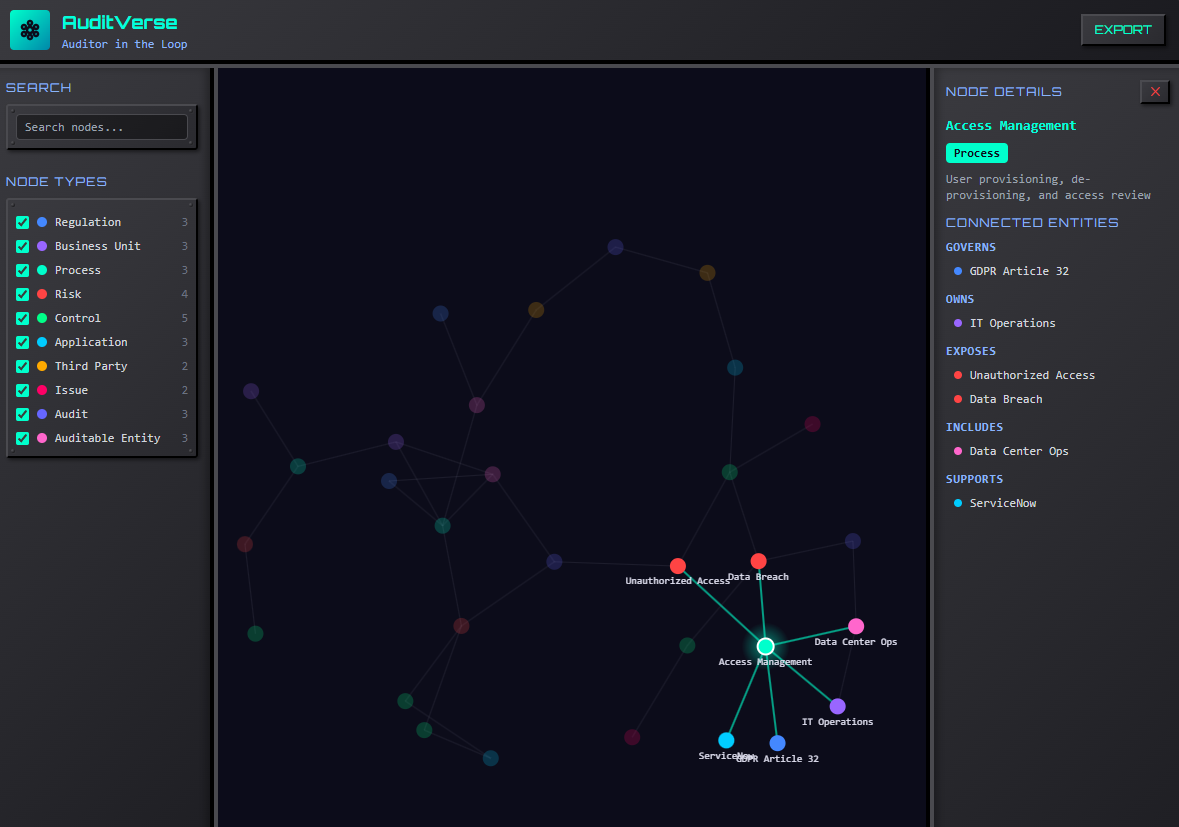
Interactive audit universe network graph showing relationships between regulations, processes, risks, controls, audits, and more.
How It Works
AuditVerse visualizes your entire audit universe as an interactive network graph. See how regulations connect to business units, processes link to risks and controls, and audits relate to issues—all in a dynamic, explorable view. The generated HTML runs entirely in your browser—no data leaves your machine.
Node Types
AuditVerse supports 10 entity types, each with a distinct color in the graph:
- Regulation — Laws, standards, and regulatory requirements
- Business Unit — Organizational divisions and departments
- Process — Business processes and workflows
- Risk — Identified risks and threats
- Control — Mitigating controls and procedures
- Application — IT systems and software applications
- Third Party — Vendors, suppliers, and external parties
- Issue — Audit findings and identified issues
- Audit — Audit engagements and projects
- Auditable Entity — Auditable units and scoped areas
Tutorial: Map Your Audit Universe with Claude Code
Collect your audit plan, risk register, control matrix, org chart, or any documentation that describes the entities and relationships in your audit universe.
Download the AuditVerse skill file and place it in your Claude Code custom skills directory. The skill will be available as a slash command.
Point the skill at your documentation. It will analyze your files, identify entities (regulations, risks, controls, processes, and more), map the relationships between them, and generate a standalone HTML network graph with everything embedded.
Open the generated HTML file. Use the left sidebar to toggle node types on/off and search for specific entities. Click any node to see its details and connections in the right sidebar. Drag nodes to rearrange the layout. Zoom and pan to explore different areas.
Click "Export" to download the JSON data. You can re-import it later or share it with your team.